


Need iPad data recovery software to restore lost or deleted files? With so many of them online, and how notoriously difficult Apple mobile devices are to recover data from, it’s easy to get lost in the marketing.
To help you make a more informed decision, we tested every single app we could find online and narrowed them down to the best of the best. Here are the top 6 data recovery apps for iPad, along with all of their features, pros, cons, pricing information, and much more.
How We Test: Want to learn how we analyze data recovery apps? We have a full page describing our entire evaluation process, so you know exactly how we arrive at our conclusion.
Don’t have time to read our analysis? We prepared a “menu” with all the important information about our top 6 apps in our Quick Comparison Table at the end of this article. But if you prefer to skip to the verdict, you can jump to our Conclusion section.
Top iPad Recovery Tools Ranked
In this section, we’ll cover the top 6 data recovery tools for iPadOS. Our team carefully analyzed every single app on this list and compiled all the details you need, so you don’t have to hunt down that information yourself.
1. Disk Drill (Best Overall iPad Recovery Software)
Brief Overview
Developer: CleverFiles
System requirements: macOS 10.15 and newer (older versions of macOS are also supported, starting with OS X 10.5), iOS 5 and newer
Pricing information:
- Free download, drive scanning, file preview, and unlimited use of backup and protection tools
- $89 per year
- $149 for a lifetime license (includes lifetime updates)
- 1 purchase of a Disk Drill subscription or lifetime license can be used for both macOS and Windows computers (up to 3 device activations) and Android recovery
Pros
- Beginner-friendly user interface
- Has the best preview tool among the list, which works for almost any file type; you can also use it for free (for as many files as you want), which is a good way to determine recoverability
- Fast scanning speed
- Affordable lifetime license
- Compatible with older iPadOS versions (including iOS 5)
- One subscription grants licenses for both Mac and Windows versions
- Works not only for iPads, but all modern iOS and Android devices, as well as storage devices like Mac drives, external HDDs, USB sticks, SD cards, etc.
- Doesn’t offer free data recovery
Summary
Disk Drill is a data recovery application with a solid reputation in the general data recovery community due to its polished user experience and consistent success rate. It similarly stands out in the Apple mobile recovery space because of its unique approach to restoring files from iOS and iPadOS devices.
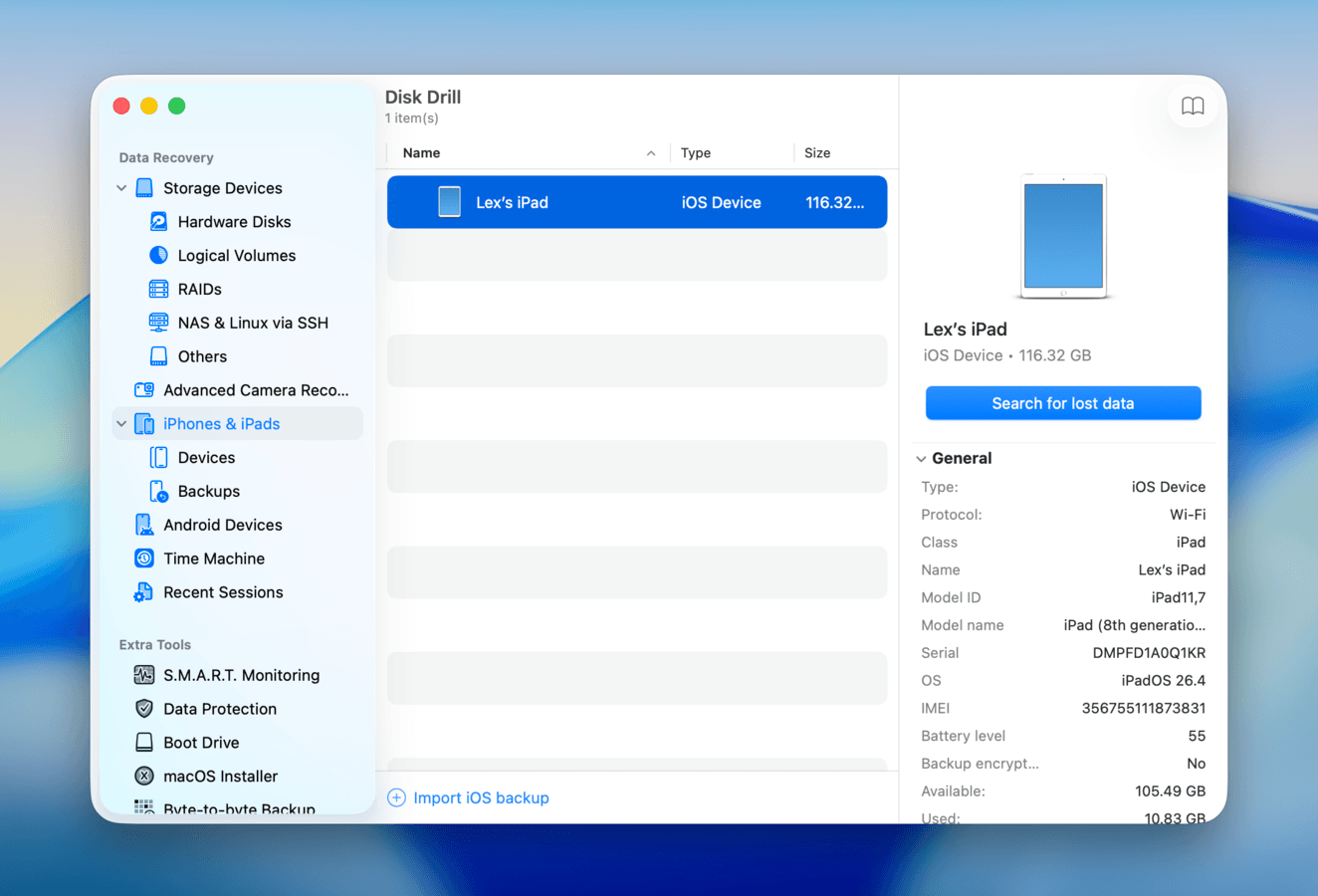
Unlike with generic storage devices, data recovery apps can’t scan iPadOS devices directly due to heightened mobile security features. Disk Drill instead makes a full backup of your iPad’s storage disk, then scans the backup. It’s also capable of recovering data from iTunes backups (of your iPad) saved on your Mac, without requiring you to format your iPad.
Aside from performance, Disk Drill has excellent usability–not only because of its interface design, but also because of features like the preview and file browsing tools. As we cover in our full Disk Drill review, this makes a huge difference in user experience and makes reviewing found files a lot more convenient. Overall, we recommend it for any users who need to restore deleted files from an iPad, with and without iTunes and iCloud backups.
Disk Drill’s license covers recovering data from other storage devices, so if you also need to restore a file from an external hard drive, SD card, USB stick, etc., it’s a good option.
Key Features
- Advanced iPad storage scan: Disk Drill works despite the heightened security of iPadOS by creating a full backup of your iPad, then scanning that backup file. This allows Disk Drill to extract whatever data was copied to the backup and save it to your Mac.
- iTunes backup scan: Any existing iTunes backups of your iPad on your Mac can be scanned directly. This way, you can extract files from previous iPad backups and save them to your Mac, instead of restoring your iPad from that backup.
- General data recovery: Aside from iPads, Disk Drill can restore data from iPhones, Android devices, macOS and Windows computers, and storage devices like USB drives, external HDDs, memory cards, etc.
- Comprehensive file type support: All basic file types are natively supported by the app, including messages, contacts, bookmarks, notes, call history, data from third-party applications, Apple RAW photos and videos, and many more.
- In-app backup decryption: If your iTunes backups are encrypted, you can decrypt them from within the app, so Disk Drill can proceed with the scan without exiting (as long as you have the correct password). This also allows you to recover other types of data, like passwords.
- Preview feature: You can preview files that were found during the scan to verify their recoverability. Disk Drill has the most reliable preview tool out of its competitors, as it works consistently well with different file types, including RAW photos and videos (e.g., HEIF, HEIC, and HEVC).
- File browsing tools: After scanning your drive, you can review data with a file browsing interface that has a search tool, file type filters, and columns you can sort by File Name, Date, etc.
- Mount as disk: Scan results can be mounted directly on your Mac as a virtual, read-only disk, which allows you to browse, copy, or open files in Finder (as if you were browsing a USB drive).
What Users Say
Disk Drill has a strong reputation online, earning good reviews from official platforms like Trustpilot, G2, and Capterra, as well as from user forums. Users often praise its consistent recovery success rate and reliable preview feature, especially as iPadOS users recover a lot of media files. CleverFiles’ customer service team is also quite popular.
“Disk Drill PRO is a great product and has rescued me on more than one occasion when files have been lost. I paid extra for the lifetime upgrades and – v.6 has just been released. The upgrade from my v.5 was easy. Response from customer service is very quick. Highly recommended.” – Trustpilot user
| Platform | Rating |
| Trustpilot | 4.5/5 |
| G2 | 4.0/5 |
| Capterra | 3.5/5 |
2. iMyFone D-Back (Good for Casual Recovery)
Brief Overview
Developer: iMyFone Technology Co., Ltd.
System requirements: macOS 10.9 and newer, iOS 7 and newer
Pricing information:
- Free download, device scanning, and file preview
- $49.99 per month
- $69.99 per year
- $79.99 for a lifetime license
Pros
- Modern and user-friendly interface
- Impressive number and depth of features for its price
- You can pre-select which data types you want D-Back to scan for
- One of the few entries on this list that can attempt repair on corrupted or fragmented media
- All features are clearly included in a single price, unlike other apps that make it confusing (e.g., if the repair tool is included versus being a separate purchase)
- Like Disk Drill, you can use D-Back on other iOS devices, Android devices, hard drives, USB sticks, and other external storage devices
- No free data recovery
Summary
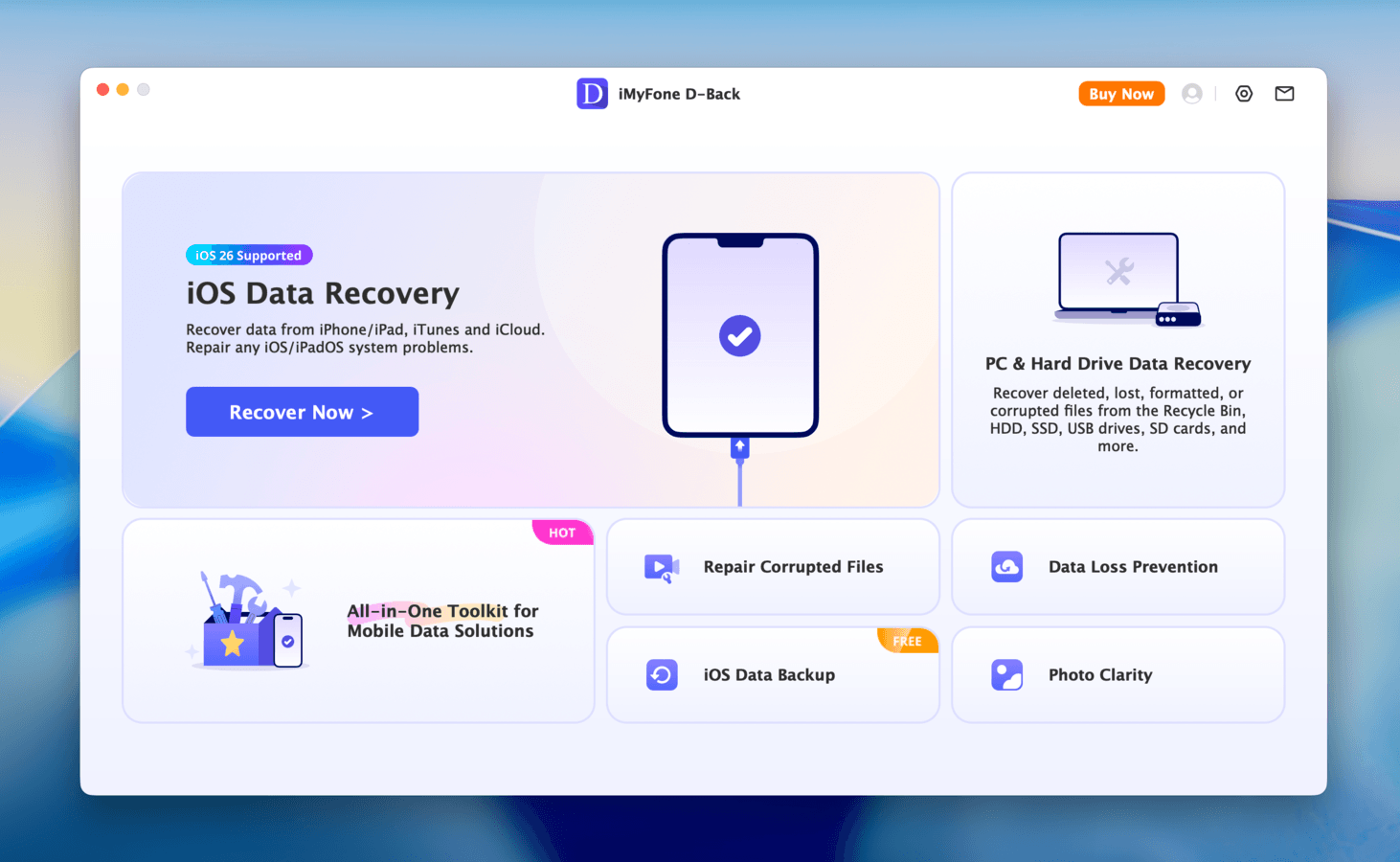
iMyFone D-Back is another popular all-around data recovery app that can restore files from your iPad, as well as your iTunes and iCloud backups. It has a great interface, a good set of features, and several useful tools for when your device or your media files get corrupted.
While testing the app, we found several noteworthy features that earned it a top place in this list. First, like Disk Drill, it’s one of the very few iOS/iPadOS-compatible recovery apps that also work on other storage devices. Second, the interface is very clean and functional. The file browsing menu in particular (for analyzing scan results) allows you to sort found files by app and by data type, which makes it very convenient to locate the right files.
Finally, we appreciated the inclusion of several repair tools that address system errors, as well as file corruption, which commonly happens in scenarios that cause data loss (aside from accidental deletion). Overall, iMyFone D-Back is a strong option, though it lacks the depth of Disk Drill’s recovery features.
Key Features
- iPad data recovery: The app scans your iPad for your photos, videos, documents, and other user data, and attempts to restore them to your Mac. It’s also capable of retrieving data from social apps like WhatsApp, LINE, WeChat, and Kik.
- iTunes & iCloud recovery: You can also scan any iTunes or iCloud backups saved to your Mac. D-Bak can extract files from those backups and save them to your Mac, without having to reset your device.
- General data recovery: Aside from Apple mobile devices, D-Back can also scan Android devices, HDDs and SSDs, memory cards, and other types of storage devices.
- File browsing interface: When browsing scan results, you can filter data by app and by data type. Scan results are also displayed as thumbnails, so you can view your media files as you browse.
- AI photo & video repair: If your photos or videos won’t open properly (likely corrupted), D-Back’s repair tools can attempt to use AI to fix them.
- iOS system repair: D-Back also provides repair tools for common iOS system errors, such as black screens, Recovery Mode loops, getting stuck at the Apple Logo, and many more.
What Users Say
iMyFone D-Back has a lot of mixed presence online. On one hand, iMyFone itself has a good reputation due to other apps like Fixppo and LockWiper, which contribute to its ratings on review platforms. It also has a reputation for good customer service. However, Reddit users acknowledge that D-Back does better with older phones but struggles against more polished and updated apps.
“The customer support people got back to me within 24 hours despite our time differences. They answered my questions directly in a very positive support manner. The company needs to ensure it stay malware free, no piggy backing. Overall, very good support.” – Trustpilot user
| Platform | Rating |
| Trustpilot | 4.7/5 |
| Tekpon | 4.0/5 |
3. Dr.Fone (Feature-Rich but Expensive)
Brief Overview
Developer: Wondershare
System requirements: macOS 10.13 and newer, iOS 5.0 and newer
Pricing information:
- Free download, drive scanning, and file preview
- $89.96 per year
- $104.35 for a lifetime license
Pros
- Modern user interface with minimal lag, as well as a useful file browsing interface with app-specific filters
- Fast scanning speed
- Provides several mobile repair features not available in other recovery apps
- Can recover data from iOS and Android devices
- Ability to pre-select the data you want to scan for
- Decent preview tool
- The interface looks great, but there’s a lot going on
- Inconsistent performance
- The app is expensive for a data recovery tool, considering it only works for mobile phones, and it doesn’t perform as consistently as we hoped
- Notably poor user feedback on customer service
- No free data recovery
Summary
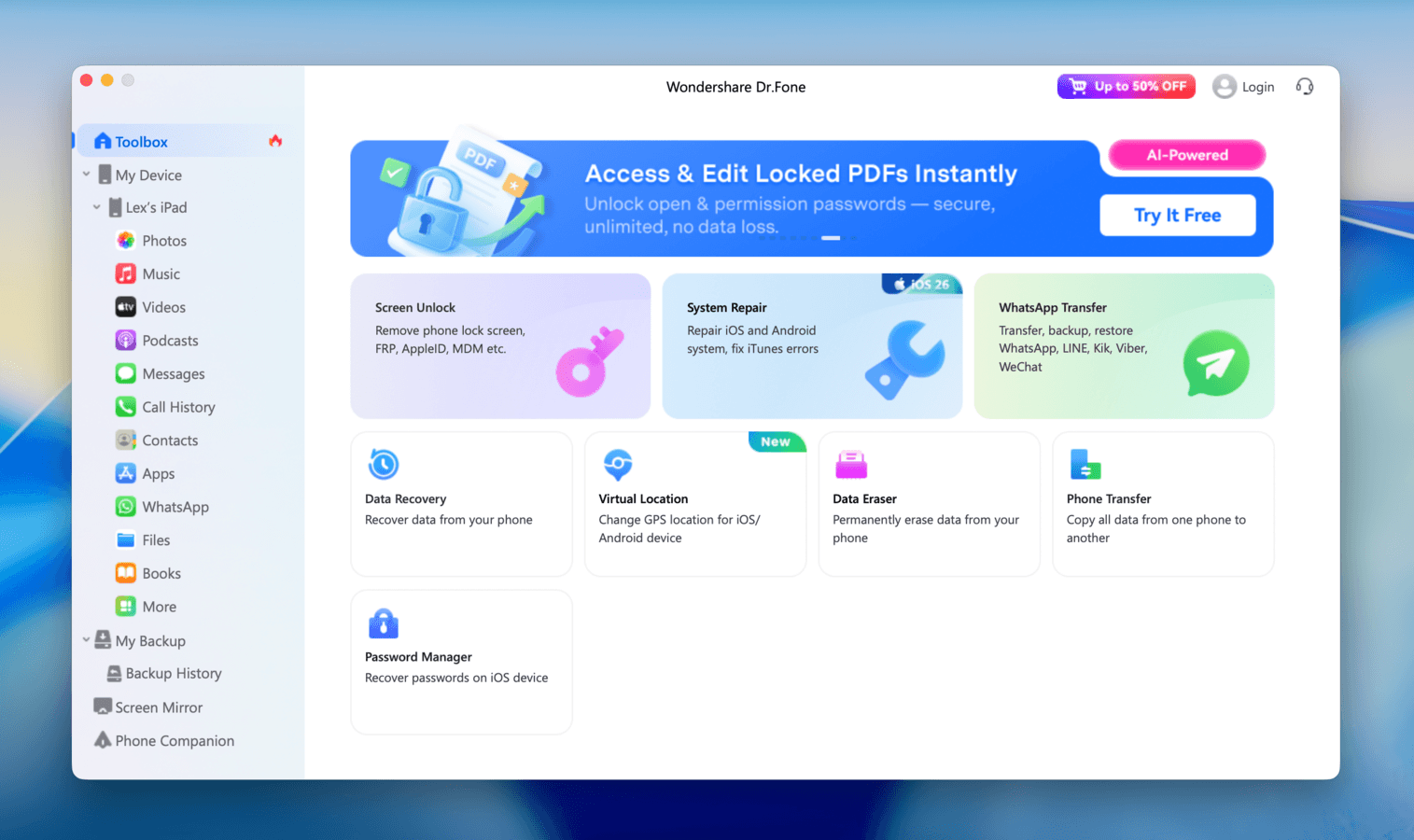
Dr.Fone is an all-in-one mobile repair and recovery toolkit. It offers a literal suite of features, ranging from data transfer to GPS spoofing, but we’ll only be focusing on tools relevant to data recovery in the context of this article.
First, the positives: Dr.Fone’s user experience for iPad data recovery is pretty good. The interface looks cluttered thanks to the number of features, but the file browsing interface makes it easy to review scan results. We also found Dr.Fone to be snappy to navigate, and it had faster scanning speeds than most of its competitors.
That said, our team’s evaluation of Dr.Fone’s data recovery performance was disappointing. While the app managed to surface all of our iPad’s existing data, none of the deleted files (that weren’t backed up) appeared in the scan results. It performs a lot better when extracting files from backups. Overall, we recommend Dr.Fone if you can maximize its other tools–like the data transfer and system repair features. If you’re looking for a high-performance data recovery tool, other options may be better.
Key Features
- Multi-vendor data recovery: Dr.Fone can attempt data recovery directly from your iPad, and from iTunes and iCloud backups. It can also restore data for third-party apps like WhatsApp, Viber, LINE, and Kik.
- File browsing interface: The app’s file browsing interface allows you to filter data by app via the sidebar (e.g., show only data from the Notes app or iOS Messages). Third-party apps are also included in the filters, which we found very useful.
- Preview feature: Files can be previewed in the sidebar, but they also appear as thumbnails in the scan results for easier browsing.
- System repair: You can attempt to repair common malfunctions like iTunes errors, a failed update, a frozen interface that can’t be shut off, a black or white screen loop, inexplicable battery drain, and more. Based on user feedback (covered below), this feature works great for some issues, but is ineffective for others.
- Data transfer: User data, including SMS messages, photos, video, music, voicemail, contacts, and contact blacklist, and many more, can be freely transferred between your iPad and other devices without using iTunes or equivalent solutions.
- Extra features: The app has a plethora of features that don’t help with data recovery and protection that we won’t cover in-depth, like the Data Eraser and Virtual Location.
What Users Say
Similar to iMyFone, Wondershare has several mobile apps that contribute to its rating on review platforms. That said, Dr.Fone has a solid reputation among reviewers, especially when dealing with data from social apps (e.g., WhatsApp chat history). Reddit users have been a lot more mixed; some users acknowledge that it works for some people, especially if your iPad kept the cache data, while others outright call it a scam.
“I struggled to find a way to transfer my WhatsApp Business chats from Android to iOS since the official ‘Move to iOS’ app doesn’t support business accounts well. Dr.Fone handled the transfer perfectly. It kept my chats and media intact. The process was straightforward, though you need to follow the instructions carefully on the screen. Highly recommended if you are stuck switching phones!” – Trustpilot user
| Platform | Rating |
| Trustpilot | 4.3/5 |
| G2 | 3.6/5 |
| Capterra | 3.0/5 |
4. Tenorshare UltData (Strong Backup Support)
Brief Overview
Developer: Tenorshare Co., Ltd.
System requirements: macOS 10.10 and newer, iOS 9 and newer
Pricing information:
- Free download and drive scanning, and free preview for the first 4 files
- $55.95 per month
- $59.95 per year
- $69.95 for a lifetime license
Pros
- Offers repair tools
- Special scanning options for social apps
- Supports older iOS/iPadOS versions
- Free preview in the trial version of the app is limited to the first 4 items of deleted data (which makes it hard to verify if your files are recoverable before committing to a license)
- The app feels expensive considering what its competitors offer for a similar or slightly higher price
- Interface isn’t as snappy as other apps on this list
Summary
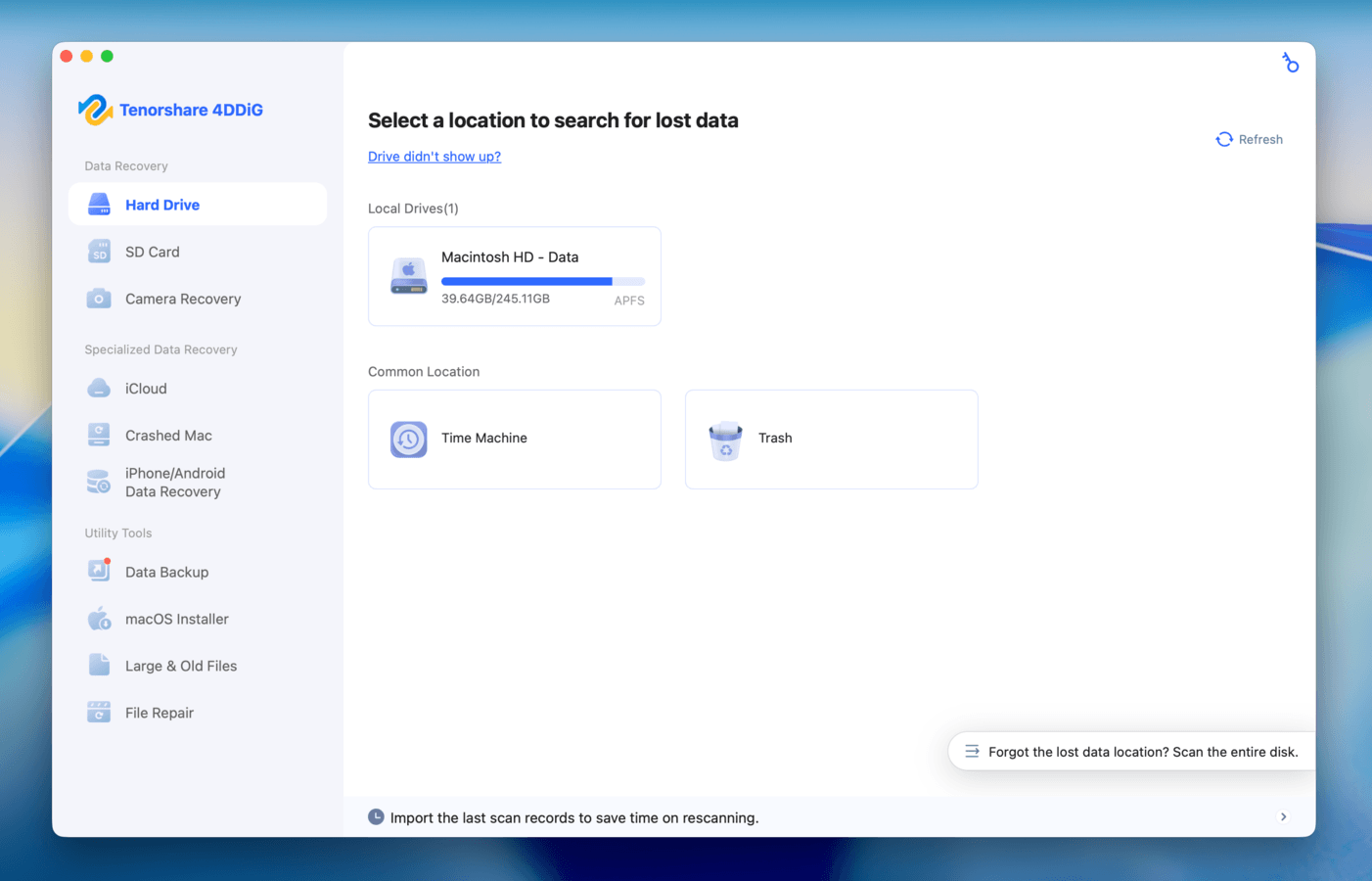
Tenorshare UltData, also rather popular, is an iOS and Android recovery app with a nice interface, a good set of core features, and unique tools specifically catering to heavy users of social apps. UltData has separate scanning modes for social apps specifically, like LINE, Kik, and WhatsApp. It also has a backup and restore feature for social app data, which we felt added to its overall utility.
In terms of general file recovery, the app will attempt to scan your iPad for data even if you don’t have backups, but it’s better at extracting files from iCloud and iTunes. iCloud users can sign in directly from the app and access files from inside the interface–we found this feature useful for consolidating data from different sources.
UltData’s repair tool was also effective; if you’re unable to complete the recovery step due to your iPad freezing or because of a Recovery Mode loop, you might be able to fix it and salvage your files. Topping it off with a clean interface, UltData is a solid app. It’s just not as polished a recovery tool compared to its competitors, considering its price range (which is why it’s lower on the list). The highly limited preview feature was also a major disappointment, as it’s one of the best ways budget-conscious users can even check if their files are recoverable.
Key Features
- AI data recovery: UltData app uses AI to attempt to scan your iPad and retrieve data, including photos, videos, messages, contacts, and more.
- iTunes & iCloud recovery: iTunes and iCloud backup data can also be restored on your Mac, so you don’t need to format your iPad to restore backup files.
- iCloud data viewer: You can sign in to your iCloud account directly from within the app and download your synced files to your Mac. You can also restore certain data types, like Contacts, directly to your iPad.
- Data recovery for social apps: The app has separate scanning options specifically for social apps, including WhatsApp, LINE, KakaoTalk, Kik, Viber, WeChat, Instagram, and Facebook.
- System repair: You can attempt to repair your iPad in cases like the Recovery Mode loop or a frozen interface, update errors, network issues, and other common iOS/iPadOS-related bugs.
- Backup & restore: UltData can back up your iPad data, as well as data from social apps like WhatsApp, Viber, LINE, Kik, etc., for you to restore to your device later.
What Users Say
User sentiment on Tenorshare UltData is mixed. On different review platforms, feedback ranges from 5-star praises to 1-star scam complaints. For users who got it to work, they commonly praised UltData’s easy-to-use interface and fast scanning. Forum users have similarly mixed reactions to the app, so it comes down to your individual experience.
“iPhone recovery helps me to recover my iPhone. Really useful software. It supports to windows version also. And work properly and the interface is very good and software is easy to use. All instructions provided properly.” – G2 user
| Platform | Rating |
| Trustpilot | 3.5/5 |
| Capterra | 3.8/5 |
| G2 | 3.6/5 |
5. PhoneRescue for iOS (iPad Recovery Software with System Repair)
Brief Overview
Developer: iMobie Inc.
System requirements: macOS 10.13 and newer, iOS 5 and newer
Pricing information:
- Free download, device scanning, and file preview
- $45.99 per month
- $49.99 per year
- $69.99 for a lifetime license
Pros
- The app’s repair tools have a mode for severe errors
- The file browsing interface has filters based on apps and on data types
- Scan results are displayed as thumbnails for easy browsing
- No free data recovery
- The app feels expensive for what it offers, especially once the discount period ends
Summary
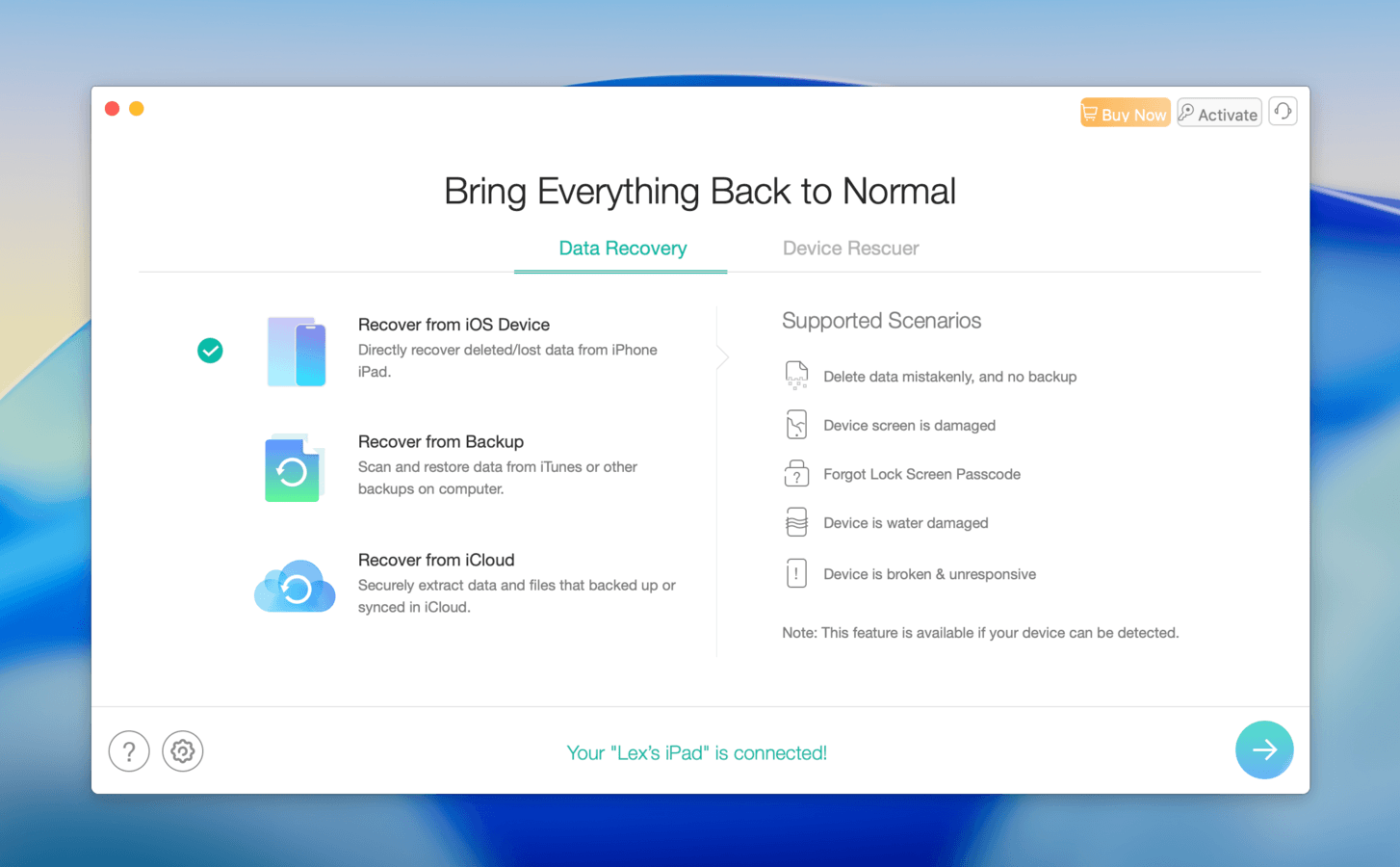
iMobie PhoneRescue for iOS is an established mobile-only recovery and repair tool with a nice interface and a useful set of features. It can attempt to restore files from your iPad, including third-party social apps, as well as scan any iCloud or iTunes backups on your Mac.
One of our favorite features of PhoneRescue was the file browser; it’s not as advanced as that of other apps, but we liked that you can filter scan results by application or data type. It also had an iOS repair feature with an “Advanced Mode” for more severe errors, which isn’t something we saw in other apps.
Advanced Mode wipes your data. We strongly recommend creating a backup of your iPad before using it.
That said, its pricing is not far from some apps that are higher in this list that have a lot more to offer in terms of both features and polish. Overall, we still recommend PhoneRescue for its streamlined and beginner-friendly experience, as well as its repair tools.
Key Features
- iPad data recovery: PhoneRescue can scan your iPad for user data, such as photos, videos, messages, contacts, call history, etc., as well as data from third-party social apps like WhatsApp, LINE, and Kik.
- iCloud & iTunes recovery: If you backed up your iPad to your Mac via iTunes or iCloud, PhoneMobie can scan those backups and extract your files directly.
- File browsing filters: While browsing found files, you can filter them by app or data type, and they are displayed as thumbnails so you can find the data you need faster.
- Repair tools: PhoneRescue’s paid version offers repair tools for common iPadOS issues, including system freezes, errors, Recovery Mode loops, and more. Note that “Advanced Mode” wipes your data.
What Users Say
Developer iMobie has a lot of reviews on official platforms like Trustpilot, but PhoneRescue feedback is somewhat sparse. The limited information we found on these platforms praises PhoneRescue for its free trial and customer service. However, some Reddit users report that recovery is possible with this app, but it’s highly dependent on having iCloud enabled.
“I don’t have to worry about missing files because of phonerescue. It enables me recover all my important files be it messanges, pictures, documents. Etc I as much as it’s backed up with phonerescue.. The beautiful thing about the app is that it offers you a free trial. They also have a good customer service.” – G2 user
| Platform | Rating |
| Trustpilot | 3.3/5 |
| G2 | 5.0/5 |
6. FoneLab iPhone Data Recovery (Budget-Friendly iPad Recovery Software)
Brief Overview
Developer: Aiseesoft Studio
System requirements: macOS 10.7 and newer, iOS 5 and newer
Pricing information:
- Free download, drive scanning, and unlimited file preview
- $49.95 per month
- $55.96 for a lifetime license
Pros
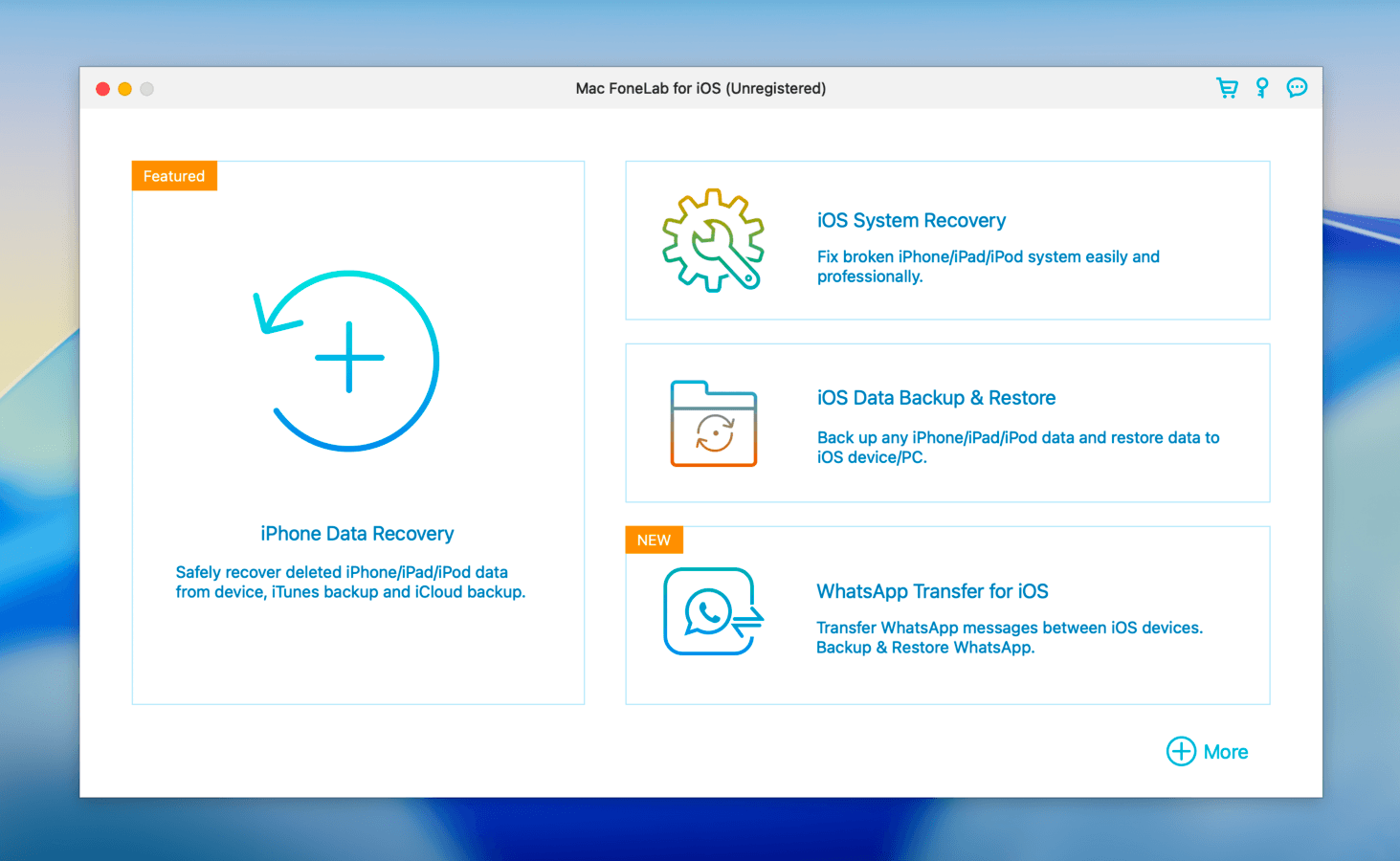
- FoneLab’s interface is easy on the eyes, even if it’s more of a storefront
- Good file browsing interface; you can pick from useful categories, and photos and videos are displayed as thumbnails for easy previewing
- Affordable lifetime license
- Very confusing subscription model and interface; certain modules appear as features, but you have to unlock them with a separate license
- Underwhelming for its price, especially compared to other apps in its range
- No free data recovery
Summary
FoneLab iPhone Data Recovery is a beginner-friendly and affordable solution that works just fine for iPads, despite its name. It has a decent interface that makes the recovery process really convenient, like the type categories in the file browser’s sidebar, and displaying found files as thumbnails in the explorer window. It also specifically restores data related to social apps, like WhatsApp, KiK, QQ, and Viber, and it has one of the lowest lifetime subscriptions on this list.
That said, while FoneLab’s interface is clean and beginner-friendly enough, we were put off by the main navigation page. While the features “iOS System Recovery”, “iOS Data Backup & Restore”, and “WhatsApp Transfer for iOS” appear alongside “iPhone Data Recovery”, you need separate licenses to use each of these features (unless you buy the FoneLab bundle option for $99 ~ $133.75).
Key Features
- iPad data recovery: FoneLab can attempt to restore files directly from your iPad, including chat history from apps like WhatsApp, Viber, and WeChat.
- iTunes and iCloud recovery: If you have iTunes or iCloud backups saved to your Mac, you can use the app to view and download their files directly, without having to factory reset your iPad.
- Extra paid features: If you purchase FoneLab’s bundle subscription, or you purchase each tool’s individual licenses, you gain access to an iPad repair feature, a backup and restore tool, and file transferring of WhatsApp data between iOS devices.
What Users Say
FoneLab doesn’t really have the same level of coverage as other apps on this list have, but it has a modest reputation among its limited users. It’s mostly praised for providing a decent performance and user experience for a low price.
“The paid data recovery did exactly what it said for me, I got the data off my broken iPhone X no worries. Later my pc died and upon reinstalling the program my registration code didn’t work, but a quick email to the company got it sorted out, and I was re-registered without hasssle” – Trustpilot user
| Platform | Rating |
| Trustpilot | 3.0/5 |
| G2 | 4.0/5 |
Is There Any 100% Free iPad Recovery Software
“Free iPad Recovery Software” almost always means that the application itself is free to download and you can use some of its tools for free, but you can’t actually restore any files without a paid subscription. Here are the most common “free stuff” you actually get from iPad recovery apps:
- Scanning your iPad and browsing found files
- Previewing data to check if it’s recoverable
- Scanning iTunes and iCloud backups (but not restoring the files)
Recovering data for free is more common in drive recovery software applications–a great example is PhotoRec (along with its sister software TestDisk), which is completely free and open source. However, it doesn’t support iPad recovery.
iPad Recovery Software Limitations You Should Know About
iPads (as well as iPhones and iPod touch devices) are designed for performance and heightened security. While recovery is still possible without backups in certain cases, iPadOS makes it a lot harder for iPad recovery software to scan its storage disk and restore files.
We want to briefly cover exactly how iPadOS’s security features work in relation to data recovery just to help set your expectations:
- Hardware-level encryption: iPadOS doesn’t provide direct access to its files; you can only scan backups for remaining fragments of deleted or lost files. Since recovery tools can’t directly access the device’s memory, their ability to restore data is limited–especially compared to recovering data from traditional storage devices (e.g., external HDDs).
- Sandboxing: Even Mac-based recovery apps can only get limited access to your iPad data because iPadOS itself has its own internal permissions regarding data sharing.
- Media Transfer Protocol: iPadOS uses MTP, which is a much stricter connection between USB class devices (like iPads) and computers.
- Garbage collection: The “garbage collection” function is highly aggressive on iPads to ensure a consistently smooth performance. But fewer data fragments are left behind, making it harder for recovery tools to restore files.
Fortunately, almost all iPad recovery apps allow you to see the scan results for free–so you can find out if your files are still on your device. But we also recommend that you choose an app with a strong preview feature; being able to “see” your files’ contents is a good indication that they can be recovered.
Quick Comparison Table
Don’t have time to review each app one by one? We provided a quick comparison table that contains all the details you need to get a clear idea of what each app has to offer:
| OS Support | iOS/iPadOS Compatibility | Free Trial | Price | Best Feature | |
| Disk Drill | macOS 10.15.7 and newer | iOS 5 and newer | Free device scanning and file preview | $89 per year, $149 for a lifetime license | Best recovery performance for iPadOS without backups |
| iMyFone D-Back | macOS 10.9 and newer | iOS 7 and newer | Free device and file preview | $49.99 per month, $69.99 per year, $79.99 for a lifetime license | Ability to repair corrupted photos and videos |
| Dr.Fone | macOS 10.13 and newer | iOS 5 and newer | Free device scanning and file preview | $89.96 per year, $104.35 for a lifetime license | System repair tools and data transfer |
| Tenorshare UltData | macOS 10.10 and newer | iOS 9 and newer | Free device scanning, free preview for the first 4 files | $55.95 per month, $59.95 per year, $69.95 for a lifetime license | Recovery mode specifically for social apps |
| PhoneRescue for iOS | macOS 10.13 and newer | iOS 5 and newer | Free device scanning and file preview | $45.99 per month, $49.99 per year, $69.99 for a lifetime license | Filter found files by app and by data type |
| FoneLab iPhone Data Recovery | macOS 10.7 and newer | iOS 5 and newer | Free device scanning and file preview | $49.95 per month, $55.96 for a lifetime license | Beginner-friendly interface |
Conclusion
Based on our analysis of the 6 best iPad recovery apps on the market, we chose Disk Drill as the #1 choice. While the other 5 apps are also great solutions, Disk Drill’s method of creating its own backup of an iPad’s storage disk has yielded the most consistently successful results (especially if no prior backups are present). It also has the best preview feature by far, which is a great tool for verifying if your data is even recoverable–and the feature is free to use.
While there’s no perfect recovery app, we felt that Disk Drill provided the most value for its cost. That said, if your iPad is experiencing errors or producing corrupted photos during recovery, iMyFone D-Back and Dr.Fone (#2 and #3 on the list) have repair tools that might be more useful for your situation.
FAQ
- Disk Drill: Has the most reliable preview feature, can repair corrupted videos, and supports encrypted iTunes backup recovery.
- iMyFone D-Back: Easy to use and provides repair tools for system errors and corrupted media.
- Dr.Fone: Fast scanning speeds, has a data transfer feature.