

 Have you lost or accidentally deleted your photos and don’t know how to recover them? The first thing you should do is check all possible trash or recently deleted folders (depending on the device where the photo loss occurred). You should also review any available backups, including cloud storage and local backup solutions.
If none of these options help or no backups exist, a data recovery program becomes the last viable option. As long as your photos haven’t been overwritten by new data or permanently erased, chances are you can still recover them with the tools we listed below. They can be used to recover photos from SD cards, USB drives, PCs, and Mac computers. Read on to learn whether the photos on your device are still recoverable and how you can proceed with the recovery.
First Steps to Take Before Photo Recovery
Losing photos is never a pleasant experience and can easily leave you feeling confused about what to do next. To make this situation easier, or to help you prepare in advance if you’re researching photo recovery software as a precaution, we decided to start with the basics.
The photo recovery process differs depending on the device where the photos were lost. In some cases, recovery is possible without using any third-party tools at all, while in others, specialized data recovery software becomes the only remaining option.
The table below outlines the recommended first steps for the most common devices and storage types. It helps you quickly identify what to check first and determine the most appropriate way to proceed before choosing a photo recovery solution.
| Device | Solution |
| 📱 Android Phone | First, check the Trash Bin in your gallery app and any available cloud backups. If the photos were permanently deleted and no backup exists, data recovery software may help. This usually requires connecting the phone to a computer and rooting the device. If the photos were stored on an SD card(non-formatted as extended internal storage), remove the card and scan it separately using photo recovery software. |
| 💻 PC or Mac | Start by checking the Recycle Bin or Trash and any cloud or local backups. If the photos are no longer available, third-party photo recovery software can be used to scan the affected drive or partition. Recovery results depend on the storage condition and whether new data has overwritten the lost photos. |
| 💾 External Storage | Photos deleted from external storage devices can often be recovered if they haven’t been overwritten. Connect the device to your PC or Mac and scan it using data recovery software. For SD and memory cards, a dedicated card reader may be required. |
| 🍎 iPhone | Photo recovery on iPhone is more restricted due to Apple’s security model. Start by checking the Recently Deleted album and iCloud backups. If no backup is available, specialized tools like Disk Drill (supports iOS 5-26) can scan the device when connected to a Mac and attempt to recover lost photos. |
Regardless of the device from which the photos were lost, if you don’t have a relevant backup that contains the missing images, avoid using the device further and do not add new photos or other types of files. This is crucial to prevent the deleted photos from being overwritten. If overwriting occurs, recovery becomes impossible, no matter which recovery program you choose.
List of The Best Photo Recovery Software
Now that we’ve covered the basics and the first steps you should take after photo loss, it’s time to look at the best software solutions for recovering deleted photos (most of which can also restore other types of data, including videos and documents). Review each program’s description, along with its strengths and limitations, and decide which solution best fits your recovery scenario and level of experience.
Our editorial team independently assesses each data recovery solution to produce accurate, high-quality content. Discover more about our testing process.
1. Disk Drill Photo Recovery (Windows & Mac)
🏆 Best for: Disk Drill is the best photo recovery software for most users because it works across a wide range of photo loss scenarios and devices. It combines exceptional ease of use with the ability to deliver professional photo recovery results.
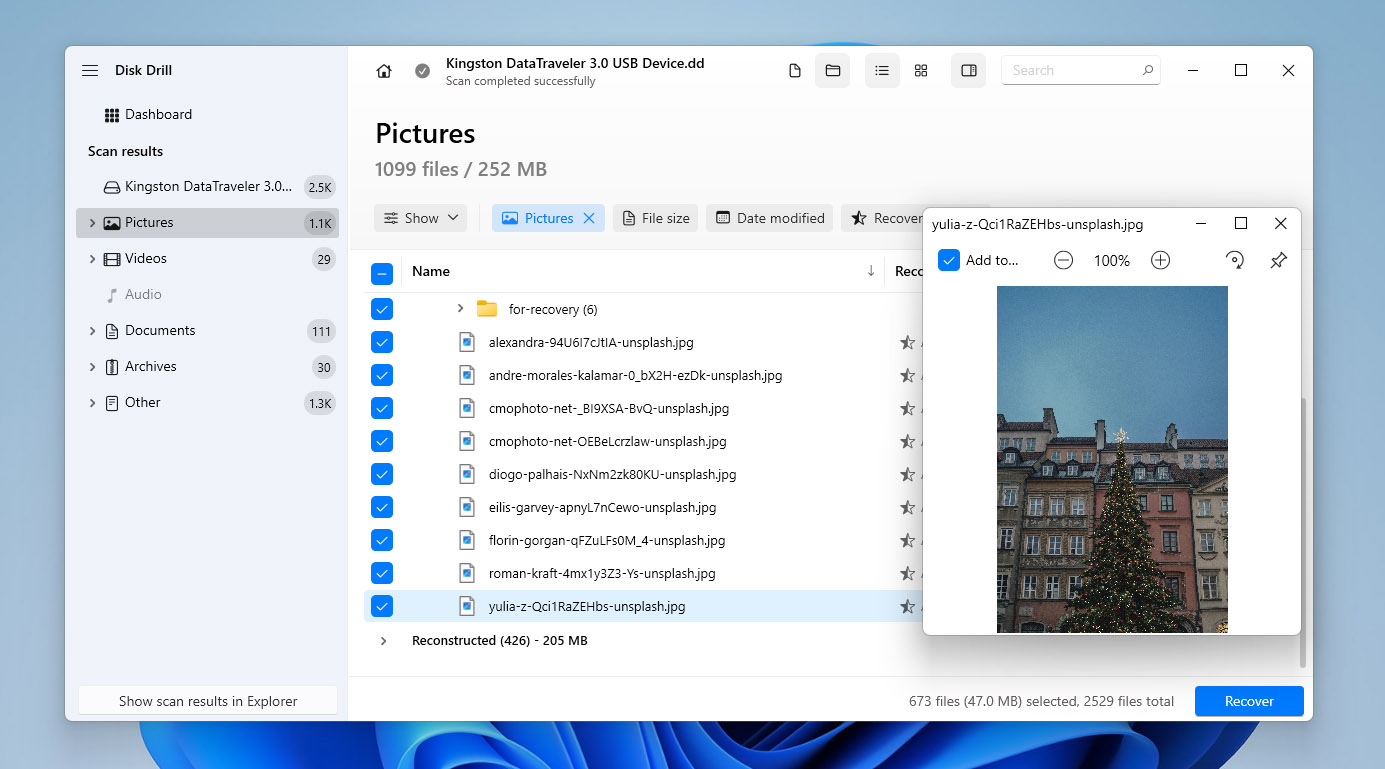
Disk Drill is a versatile photo recovery tool for Windows and macOS that can recover deleted photos from computers, external drives, and memory cards. Our Disk Drill review details how this tool handles a broad range of photo loss scenarios while remaining easy to use, even for those with no prior recovery experience.
The software automatically applies multiple scanning algorithms to locate deleted images, including common formats like JPG and PNG as well as RAW photo formats from popular camera brands. Found photos can be previewed before recovery, helping you restore only the files you actually need.
Disk Drill also includes free disk tools such as Recovery Vault and a byte-to-byte backup module, which are especially useful when recovering photos from SD cards and other removable storage devices. Combined with its clean interface and broad device support, Disk Drill stands out as a versatile photo recovery solution suitable for most data loss scenarios.
Pros
- Beginner-friendly user interface
- RAW photo recovery
- Supports all common image file formats
- Extensive knowledge base with tutorials
- Recovers images from iPhone/Android devices (Disk Drill for Mac)
- Byte-to-byte backup module for creating full disk images (useful for recovering photos from SD cards)
- The ability to pause, save, and resume scans
- 100 MB free data recovery (Windows version only)
- The macOS version only allows file preview in the free edition (actual photo recovery requires an upgrade)
- Can’t fix corrupted photos or images
💻 Supported devices: Windows and macOS computers; internal and external drives; USB flash drives; SD, microSD, SDHC, and SDXC cards; digital cameras (via memory cards); Android devices (internal storage or SD cards); iPhone and iPad (photo recovery via device scan or backups).
💰 Pricing:
| Disk Drill Basic | Free |
| Disk Drill PRO | $89.00 |
| Disk Drill Enterprise | $499 |
| Competitive Upgrade | 50% OFF |
What users say:
Hi, just wanted to say that Disk Drill v6 did a great job recovering data from a Sony A7 IV memory card using the Advanced Camera Scan mode about two weeks ago. Filtering the results by date was also very helpful. (Hanalog, Trustpilot user)
Drill disk saved me for sure. My camera card got deleted by accident at a photography workshop recently. My daughter’s PROM pictures were lost until I tried Drill Disk! Recovered everything! (Montie, Trustpilot)
Software rating:
| Platform | Rating | Number of Reviews |
| Trustpilot | 4.5 | 419 reviews |
| Capterra | 3.7 | 11 reviews |
| G2 | 4.0 | 62 reviews |
| Average rating | 4 |
2. R-Studio (Windows, Mac, and Linux)
🏆 Best for: R-Studio is difficult to recommend to beginners because it lacks the intuitiveness of Disk Drill. An inexperienced user could easily get lost in the vast sea of available options and fail to recover deleted photos. However, professionals and power-users shouldn’t hesitate to give it a try.
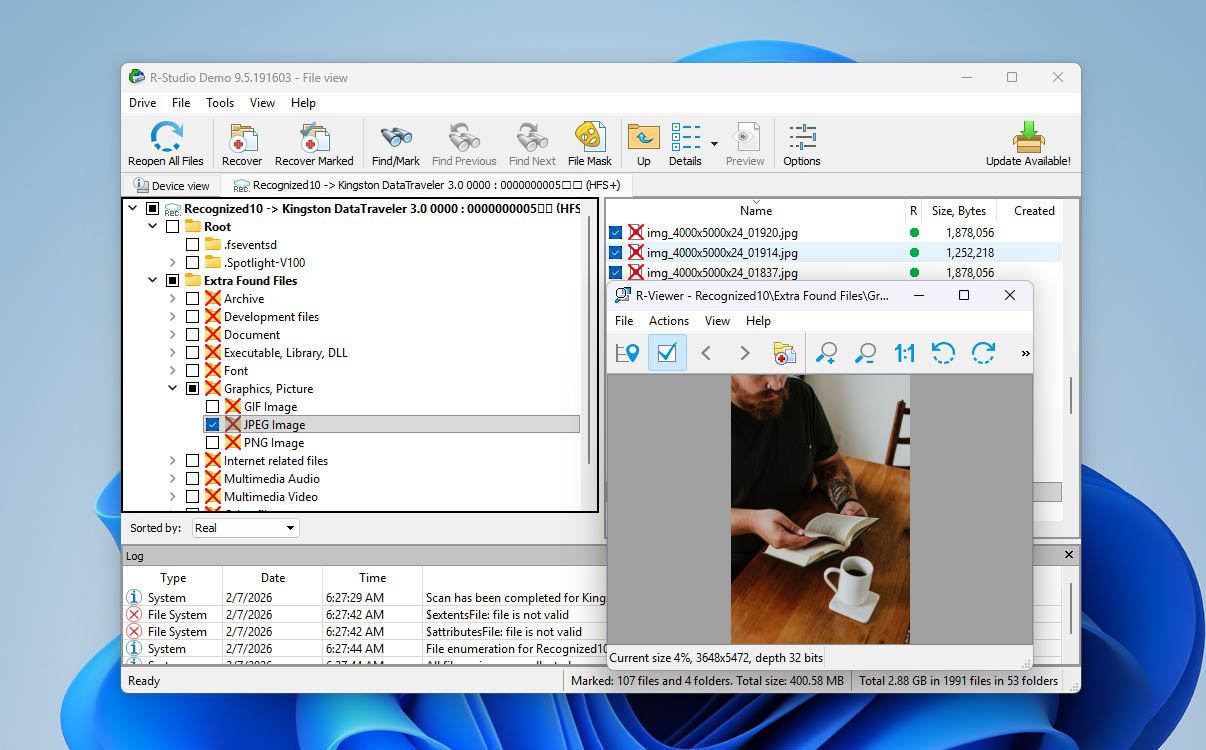
R-Studio is a professional-grade photo recovery solution with enough features to satisfy the needs of data recovery experts who recover lost and deleted photos for a living. Some of its most noteworthy features – including advanced RAID reconstruction, a built-in HEX editor, and the ability to recover data over a local network or the internet – are explored in detail in our R-Studio review.
R-Studio excels in scanning and recovering photos from a wide range of storage devices, including hard drives, memory cards, USB drives, and more. Its features extend to handling corrupted photos. Its scanning algorithm also works to recover lost photos from formatted devices as well. To make sure you’re recovering the right images, R-Studio also allows you to preview your images before proceeding.
Pros
- Powerful features
- Support for Windows, Mac, and Linux
- Can recover remote locations
- Familiar File Explorer-style interface
- Not intended for casual users
- Expensive to unlock all features
💻 Supported devices: Windows, macOS, and Linux computers; internal and external hard drives and SSDs; USB flash drives; SD and memory cards; RAID arrays and network locations (mobile devices such as Android phones and iPhones are not supported for direct photo recovery).
💰 Pricing:
| Product | Windows | macOS | Linux |
| Free version | Recover files less than 256 KB in size | Recover files less than 256 KB in size | Recover files less than 256 KB in size |
| R-Studio FAT | $49.99 | – | – |
| R-Studio NTFS | $59.99 | – | – |
| R-Studio | $79.99 | $79.99 | $79.99 |
| R-Studio T80+ | $80 | $80 | $80 |
| R-Studio Corporate | $179.99 | $179.99 | $179.99 |
| R-Studio Technician | $899 | $899 | $899 |
[ If R-Studio feels too expensive for your needs, there is a free alternative called R-Photo that uses the same data recovery engine and designed specifically for recovering photos and video files and supports both standard file system scans and raw file recovery by file signatures. R-Photo is available for Windows only and can recover data from all storage devices visible to the host Windows system
What users say:
A reliable and effective tool for recovering lost data. The interface is user-friendly and the scanning process is fast and efficient. The software supports a wide range of file systems and can recover files in many different formats. (Verified Reviewer, Capterra)
R-Studio is great software, it’s not simple and definitely seems more geared towards professionals… (gonenutsbrb, Reddit)
Software rating:
| Platform | Rating | Number of Reviews |
| Trustpilot | 3.5 | 4 |
| Capterra | 4.6 | 83 |
| G2 | 4.2 | 15 |
| Average rating | 4.10 |
3. Recuva (Windows)
🏆 Best for: Even though it has been some time since Recuva was last updated, this photo recovery tool remains a solid option for addressing more straightforward cases of data loss.
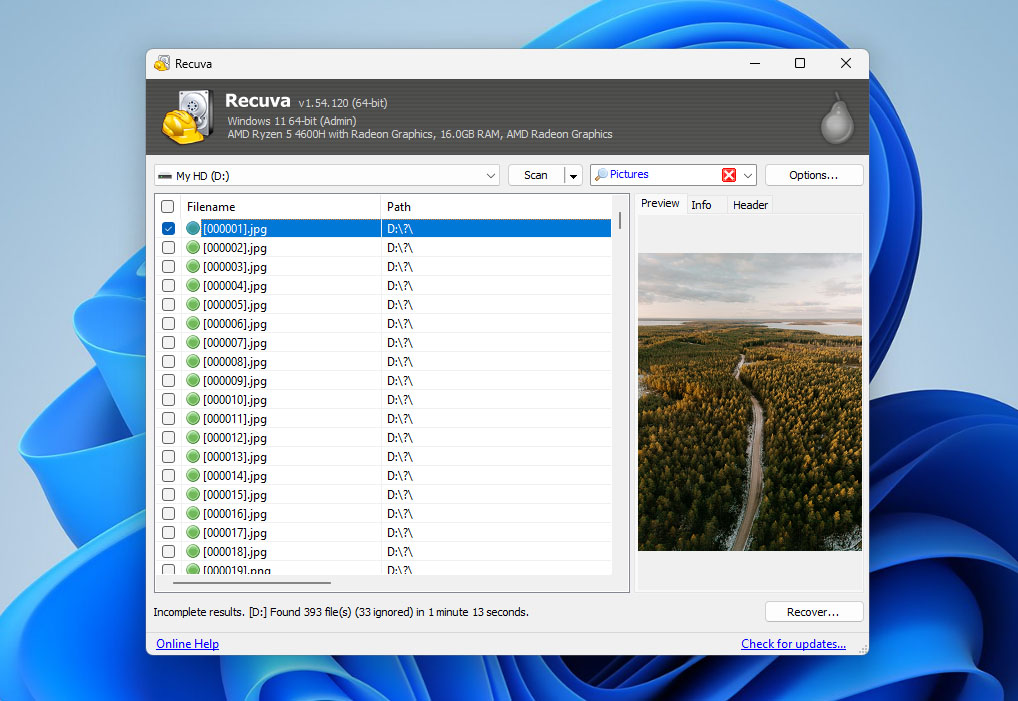
Recuva is a basic file recovery tool for Windows that we included primarily because it offers unlimited photo recovery in its free version. Our Recuva review highlights its easy-to-understand interface, which makes the tool accessible even to users with no prior recovery experience
In practice, Recuva works best for simple photo recovery scenarios. It can recover photos from internal and external storage devices such as hard drives, USB flash drives, and SD cards, and it offers a deep scan mode for more thorough searches. However, its file format support is limited compared to more advanced tools. RAW photo recovery is restricted to only a handful of formats, and file preview is also limited (JPEG files are reliably supported, but many other image formats can’t be previewed before recovery).
Recuva’s interface feels dated, and its recovery performance does not match that of more advanced photo recovery solutions featured earlier in this list. That said, for basic cases where photos were recently deleted and stored in common formats, it can still deliver acceptable results.
Pros
- Clean user interface
- Fast scans
- Recovers an unlimited amount of data for free
- Sub-par performance
- The last significant update was back in 2022 (bug fixes only)
- Requires a recognizable file system to start a scan
- Very limited preview options
💻 Supported devices: Windows computers; internal hard drives and SSDs; external drives; USB flash drives; SD and memory cards (mobile devices are not supported).
💰 Pricing:
| Recuva Free | Available without Professional features |
| Recuva Professional | $24.95 |
What users say:
FANTASTIC !!!!! .. Recovered ALL of my files. This app is amazing and is free … recovered all 975 of my files that I had accidentally deleted. (User review, Microsoft Store)
Recuva is a useful tool. When it’s simple stuff like that, that’s what I use. (Rexter2k, Reddit)
Software rating:
| Platform | Rating | Number of Reviews |
| Trustpilot | 3.3 | 2 |
| Capterra | N/A | N/A |
| G2 | N/A | N/A |
| Average rating | 3.3 |
4. PhotoRec (Windows, Mac & Linux)
🏆 Best for: PhotoRec is best suited for users who are comfortable working with a command-line interface and need to recover a relatively small number of deleted photos, as the tool does not offer file previews or selective sorting before recovery.
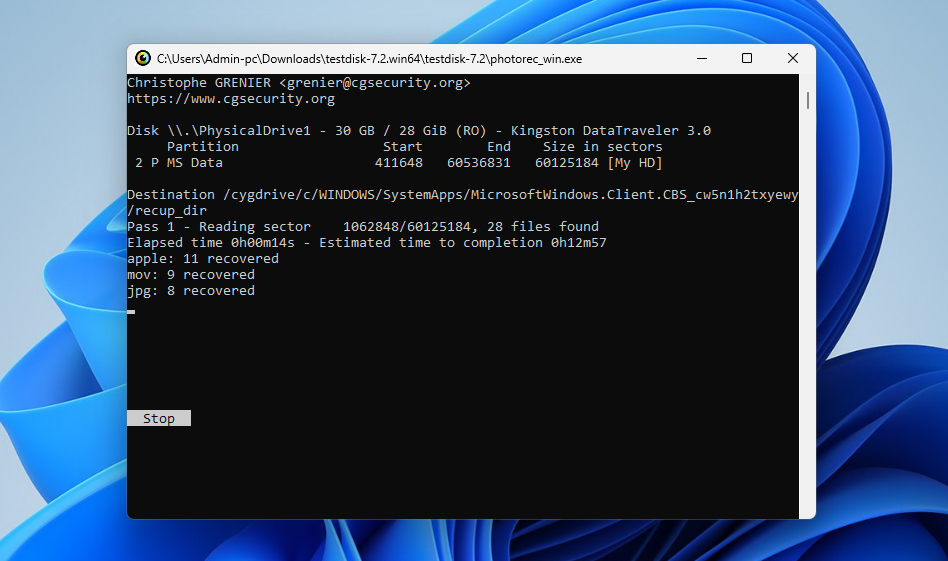
PhotoRec is a versatile recovery tool that uses a menu-driven command-line interface. In our PhotoRec review, we note that its lack of a graphical user interface makes it less ideal for casual users seeking an intuitive photo recovery program. But if the absence of a graphical user interface doesn’t bother you, then PhotoRec can recover more than 480 file extensions in about 300 file families from hard drives, CD-ROMs, memory cards, and other storage devices.
PhotoRec ensures a safe scan and photo recovery process that uses read-only access to avoid data corruption. It can also successfully scan and recover photos even from formatted storage devices. Since it’s free and has no features locked over a paywall, you’re allowed to recover as many photos as you want.
PhotoRec itself is a command-line tool by default and works through the terminal. However, when you download the PhotoRec archive, it also includes QPhotoRec, which is a graphical interface for the same recovery engine. While QPhotoRec is far from perfect and offers only basic functionality, it is still likely to be more convenient for most users than working directly with the command-line version.
Pros
- Completely unlimited and free picture recovery
- Great performance
- Runs on just about any operating system
- Works even with severely damaged file systems
- Lacks a graphical user interface
- Can’t preview recoverable files
- Not suitable for beginners
💻 Supported devices: PhotoRec runs on Windows, macOS, and Linux and can scan internal and external storage media such as hard drives, USB flash drives, SD and memory cards, including cards used in digital cameras. Direct recovery from Android and iOS devices is not supported.
💰 Pricing: PhotoRec is completely free and open-source.
What users say:
Photorec and testdisk have saved me from a few tight spots before. PhotoRec for the win! Saved my sanity two months ago. (Reddit users in r/photography discussion on PhotoRec)
Good news – it recovered over 900 files, mainly .ORF photos, whereas the other solutions I tried managed a mere 200, at best. (Glevum Owl, Cameraderie forum)
Software rating:
| Platform | Rating | Number of Reviews |
| Trustpilot | 4 | 3 |
| Capterra | N/A | N/A |
| G2 | 4.5 | 12 |
| Average rating | 4.25 |
5. SanDisk RescuePRO (Windows & Mac)
🏆 Best for: SanDisk RescuePRO is best suited for users who need to recover photos or videos from SD cards or USB flash drives and prefer a straightforward, guided recovery process. It works best in simple data loss scenarios, such as accidental deletion or formatting on flash-based media.
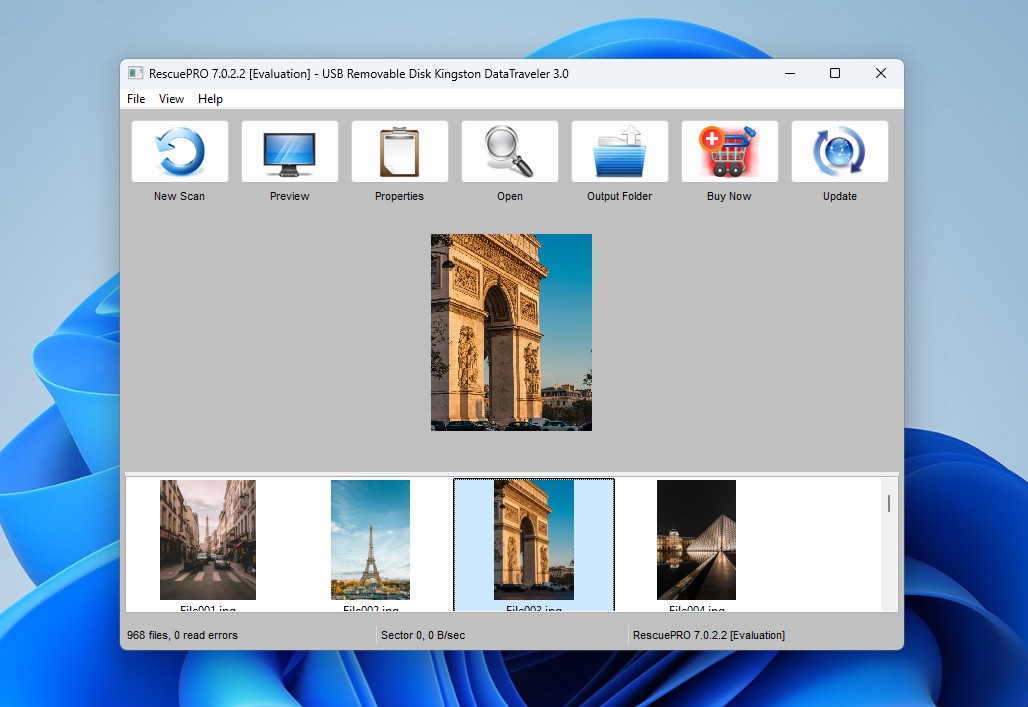
SanDisk RescuePRO (and the extended RescuePRO Deluxe version) is a recovery utility designed specifically for restoring lost or deleted files from flash-based storage devices. It focuses primarily on photos and videos stored on memory cards and USB flash drives and follows a simple, guided recovery workflow aimed at less technical users.
The software allows users to scan supported media, preview recoverable files, and restore selected items. While RescuePRO can handle common photo and video formats, its overall recovery capabilities are narrower compared to full-featured data recovery tools that support internal drives and complex file systems.
Pros
- Designed specifically for flash-based storage devices
- Simple, step-by-step recovery workflow
- Allows preview of recoverable photos and videos
- Available for both Windows and macOS
- Not suitable for complex recovery scenarios or internal drives
- Interface feels outdated compared to newer recovery tools
💻 Supported devices: SD, microSD, SDHC, SDXC, and other memory cards; USB flash drives and other flash-based storage devices connected via USB. RescuePRO works on Windows and macOS computers. Internal hard drives, SSDs, RAID arrays, and mobile phones are not supported.
💰 Pricing:
| Version type | Windows | macOS |
| Free version | Preview only | Preview only |
| 1-year RescuePRO® Standard | $39.99 | $39.99 |
| 1-year RescuePRO® Deluxe | $59.99 | $59.99 |
| 1-year RescuePRO® Deluxe Commercial | $249.99 | $249.99 |
What users say:
I’ve used it twice (on a SanDisk Ultra and an old Lexar card) and it worked fine both times. Yeah, the interface is janky, but it recovered what I needed – Recuva didn’t even find my videos. (Naheri, HandyRecovery forum)
Program is suitable only for recovering files from very basic cases of corruption or erasure. With the way many recent SanDisk ssds have gone, if it does fail, it will be bad. The software will not help you. I mean it’s a great marketing idea on one hand, because they make you think that they are including a way to deal with picking up the pieces if something happens, but on the other hand, it’s kind of like bragging about the wonderful amenities in the lifeboat of a fancy yacht. (Zorb750, Reddit)
Software rating:
| Platform | Rating | Number of Reviews |
| Trustpilot | N/A | N/A |
| Capterra | N/A | N/A |
| G2 | N/A | N/A |
| Average rating | 3.4 |
Unfortunately, SanDisk RescuePRO does not currently have user ratings on major review platforms such as Trustpilot, Capterra, or G2. This is likely because SanDisk does not actively develop or promote data recovery software as a standalone product, focusing instead on its core business of storage devices. However, leaving the software unevaluated would not be informative, so after hands-on testing and practical use, we assign SanDisk RescuePRO an average rating of 3.4.
6. Stellar Photo Recovery (Windows & Mac)
🏆 Best for: The most expensive version of this photo recovery software stands out with its ability to repair corrupted photos and videos. Just know that it takes some time to finish the job.
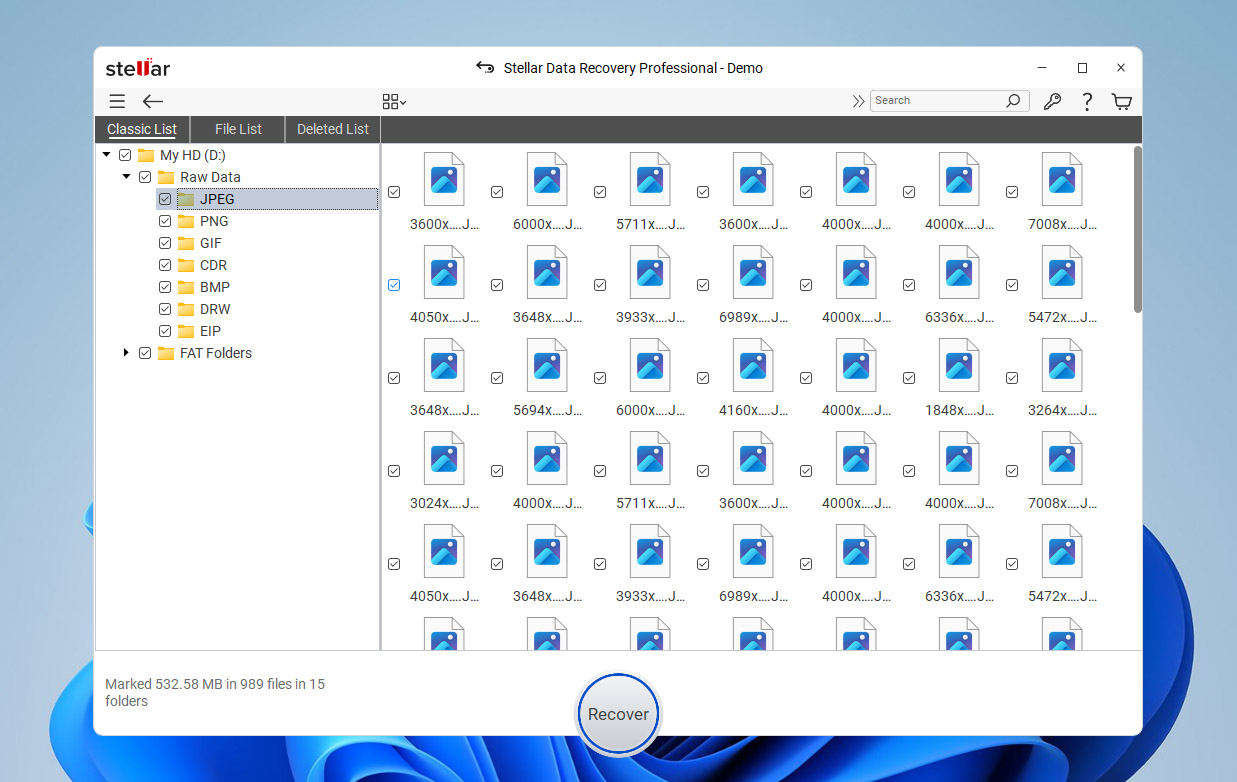
Stellar Photo Recovery is a dedicated tool for recovering deleted photos, videos, and audio files from a variety of storage devices, including SD cards, USB flash drives, hard drives, and other removable media. In our Stellar Photo Recovery review, we highlight the program’s simple, step-by-step recovery workflow, which makes it accessible to users who prefer a guided recovery process.
The program supports recovery of common image formats such as JPG, PNG, GIF, and BMP, as well as RAW photo files from many popular camera brands. It can also handle media created by action and drone cameras, provided the files were stored on supported memory cards.
One of the distinguishing features of Stellar Photo Recovery is its ability to repair certain types of corrupted photos and videos, though this functionality is limited to premium versions. Scan speeds tend to be slower compared to some other tools in this list, but the software compensates with a clear interface and a predictable recovery process suited for straightforward photo recovery scenarios.
Pros
- Three-step recovery process
- Supports many image and video file formats
- Offers several ways to preview scan results
- Repairs corrupted photos and videos
- User-friendly interface
- Can create sector-by-sector storage device images
- The least expensive version is rather limited
- Slower scan speed
💻 Supported devices: Windows and macOS computers; internal and external hard drives and SSDs; USB flash drives; SD, microSD, SDHC, and SDXC cards, including memory cards used in digital, action, and drone cameras. Mobile phones are not supported for direct recovery and require separate, device-specific recovery tools.
💰 Pricing:
| Version type | Windows | macOS |
| Free version | Preview only | Preview only |
| 1-year Standard Edition | $69.99 | $69.99 |
| 1-year Professional Edition | $99.99 | $99.99 |
| 1-year Premium Edition | $209.99 | $209.99 |
| Lifetime Standard Edition | $129 | $129 |
| Lifetime Professional Edition | $199 | $199 |
| Lifetime Premium Edition | $319 | $319 |
What users say:
I would recommend Stellar to anyone who needs to recover their files quickly and safely. It saved my work and made the recovery process straightforward. (Jitinv Venugopal, Trustpilot user)
Just a beginner but it seems to be working fine – the software recovered some of my deleted files from the recycle bin, a mixture of corrupted and working files. (u/supremecrispycrunch, Reddit)
Software rating:
| Platform | Rating | Number of Reviews |
| Trustpilot | 4.8 | 5,100+ |
| Capterra | 2.8 | 13 |
| G2 | 4.3 | 8 |
| Average rating | 3.9 |
7. AnyRecover (Windows & Mac)
🏆 Best for: AnyRecover Photo Recovery is a superb choice for users seeking a data recovery solution that’s developed with leading cameras in mind and is geared specifically towards the retrieval of lost and deleted multimedia files.
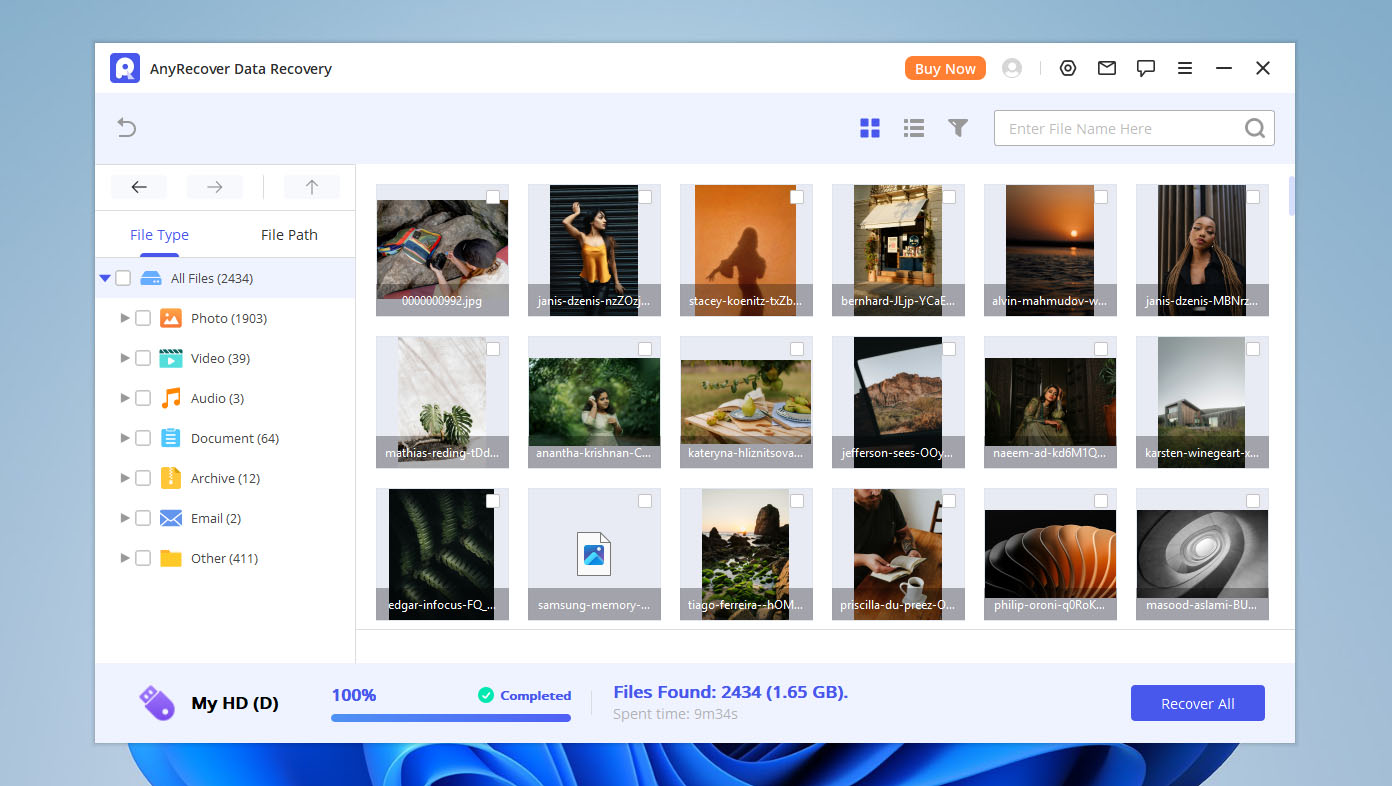
AnyRecover Photo Recovery is an outstanding photo retrieval program that specializes in getting back lost and deleted media files from a wide variety of devices, internal and external alike. It supports an impressive range of pictures, graphics, audio, and video files, and it was developed with some big brands in mind, including Sony, Canon, GoPro, Nikon, and more.
It also boasts advanced functionalities like an AI-powered photo restoration feature to fix blurry images. Before recovery, you can also freely preview all the photos AnyRecover scanned so you know which images you want to restore. AnyRecover Photo Recovery is available for both Windows and Mac and works with a healthy repertoire of storage devices and data loss scenarios.
Pros
- Incredibly easy to use
- Includes versions for both Mac and Windows
- Capable of recovering a variety of multimedia files
- Works with a variety of big camera names
- Supports a long list of storage media and file types
- Can retrieve files from a lot of different data loss scenarios
- Includes a free version that lets you scan a drive and preview files
- You can’t reliably assess actual recoverability
- The free version only allows preview of recoverable files, not actual recovery
- Folder-based scan modes (Recycle Bin, Desktop, selected folders) are misleading
💻 Supported devices: Windows and macOS computers; internal and external hard drives and SSDs; USB flash drives; SD and memory cards; digital cameras; Android phones and iPhones.
💰 Pricing:
| Product | Monthly | Annual | Lifetime |
| Windows | $79.99 | $99.99 | $159.99 |
| MacOS | $79.99 | $99.99 | $159.99 |
What users say:
I purchased the software to recover my files. I had over 1000 files that completely disappeared. Thankfully this app was a lifesaver. I was able to recover all of my files!! Thank you! 😊 (Mutua Daniel, Trustpilot user)
The website is really confusing, but customer support is very good. The program did a great job of recovering files from a corrupt SD card. (Christine Hass, Trustpilot)
Software rating:
| Platform | Rating | Number of Reviews |
| Trustpilot | 4.7 | 382 |
| Capterra | N/A | N/A |
| G2 | 2.0 | 1 |
| Average rating | 3.35 |
8. CardRecovery (Windows& Mac)
🏆 Best for: If you intend to recover deleted photos only from memory cards, then CardRecovery is an affordable solution that delivers decent results thanks to its SmartScan technology.
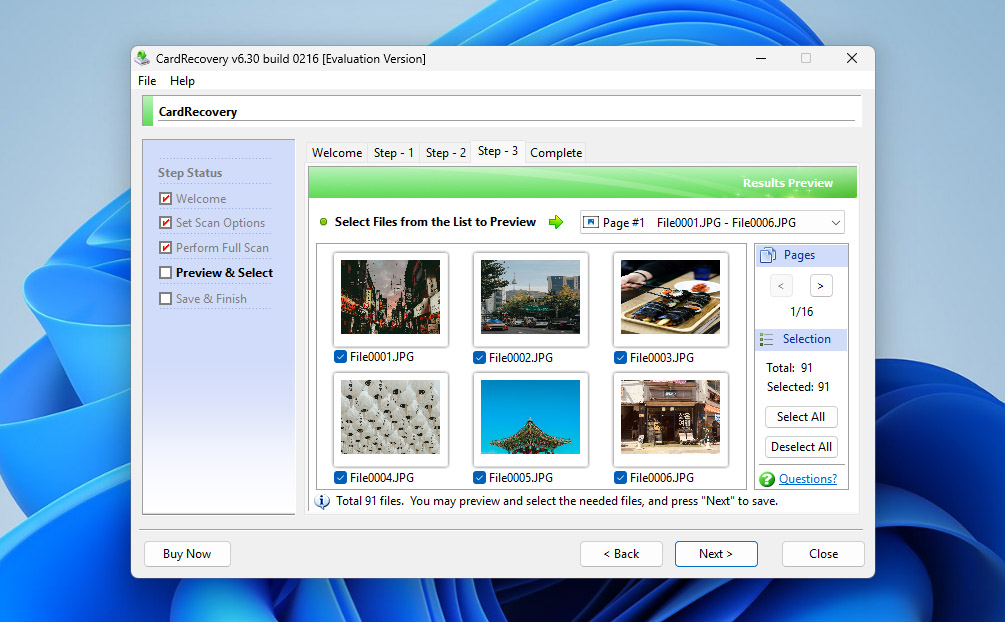
As its name suggests, CardRecovery is a photo recovery application focused on retrieving lost, deleted, corrupted, or formatted photos from various memory cards (including SD cards of all types, CF cards, xD-Picture cards, and more). As we mention in our CardRecovery review, the program’s core SmartScan technology can quickly locate and restore lost photos without moving or modifying other data, minimizing the risk of additional data loss. All the pictures it finds during a scan can be previewed before recovery, allowing you to choose only the ones you want to restore.
Notably, CardRecovery specializes in scanning and recovering photos from digital camera cards. It even retrieves and displays all photo information in real-time during a scan, including the camera settings, shooting time, and the camera model used to take the photo. Incorporated in its algorithm is the capability to not just recover common image formats, but also RAW formats like Fuji RAF, Nikon NEF, Canon CRW CR2, and many more.
Pros
- Limited to read-only operations
- Step-by-step recovery wizard
- Free trial available
- Unique and exclusive SmartScan technology
- Supports almost all memory card types
- Outdated user interface
- Limited file format support
- The software has not received updates since 2021
💻 Supported devices: Memory cards only, including SD (SD, SDHC, SDXC), microSD (microSD, microSDHC), CompactFlash (CF), xD-Picture Card, Memory Stick, and other similar card formats with capacities up to 256 GB.
💰 Pricing:
| Free trial | Enable with limited functionality |
| Full version | $39.95 |
What users say:
Cardrecovery helps me a lot and restores all my lost files. There were many very important files in my SD card. However, my SD card crashed and all the files were lost one day. I was very upset about this. I have tried many methods to restore my files . Only Cardrecovery helps me do that and all my files are restored. Many thanks. (Ela KR, Trustpilot user)
The program CardRecovery worked, albeit some of the files were split up. Most file recovery programs don’t support MTS files, but CardRecovery (and Recover My Files) both did.” (Trucci, DVXuser forum)
Software rating:
| Platform | Rating | Number of Reviews |
| Trustpilot | 3.8 | 2 |
| Capterra | N/A | N/A |
| G2 | N/A | N/A |
| Average rating | 3.8 |
So, Which Photo Recovery Software Is the Best?
Even though we’ve narrowed the list down to eight photo recovery tools out of the hundreds available online, choosing the right one can still feel overwhelming. At first glance, many of these programs may look similar, yet they differ significantly in terms of features, supported devices, recovery methods, and overall workflow.
In practice, the best way to find your favorite tool is to try a few options yourself and see which one feels the most intuitive and suitable for you. To make that initial selection easier, we’ve put together a comparison table that highlights the key characteristics of each photo recovery solution. This overview should help you quickly identify which tools are worth testing first.
The comparison table is provided below for your reference:
| Feature | Disk Drill | R-Studio | Recuva | PhotoRec | Stellar Photo Recovery | AnyRecover | CardRecovery | SanDisk RescuePRO |
| Usability | Excellent | Good | Good | Limited | Good | Good | Limited | Good |
| Free recovery limit | 100 MB (Windows only) | Files < 256 KB | Unlimited | Unlimited | Scan only | Scan only | Scan only | Scan only |
| Preview recoverable data | ✔ | ✔ | ✔ | ✘ | ✔ | ✔ | ✔ | ✔ |
| Extra tools | S.M.A.R.T. monitoring, Recovery Vault, disk image | Disk imaging, RAID tools | Secure file deletion | ✘ | Media repair tools | AI photo enhancement | ✘ | ✘ |
| Supported OS | Windows & macOS | Windows, macOS & Linux | Windows | Windows, macOS & Linux | Windows & macOS | Windows & macOS | Windows & macOS | Windows & macOS |
| Primary focus | All storage & photo recovery | Professional data recovery | Basic file recovery | Raw file carving | Photo & media recovery | Photo & mobile recovery | Memory cards only | Flash-based media only |
| Price | $89 lifetime (Win + Mac) | From ~$79 (varies by edition) | Free / ~$24.95 Pro | Free | From ~$69.99/year | From ~$79.95 | ~$39.95 | ~$39.99 / ~$59.99 (Deluxe) |
Based on our comparison, Disk Drill stands out as the overall winner. We appreciated its strong photo recovery capabilities, clear and guided recovery process, modern interface, and reasonable pricing model. A lifetime license instead of a monthly or annual subscription makes it a practical choice for long-term use. Disk Drill works equally well for users who are trying photo recovery software for the first time and for those who already have some recovery experience.
If price is the main deciding factor, PhotoRec is the clear winner. It’s completely free and can be very effective at recovering deleted photos. That said, its command-line interface won’t be comfortable for everyone, and the lack of preview and sorting means you’ll likely spend additional time filtering through recovered files to find the photos you actually need. The same general category also includes Recuva, which offers unlimited free recovery, but only for basic file types and straightforward scenarios. JPEG photos are usually fine, while RAW formats and more complex cases are not its strong side.
In the end, the final choice depends on your specific needs and preferences. We recommend reviewing the comparison table and individual tool descriptions once more and, if possible, testing a couple of options yourself. Good luck with your photo recovery—and if you have the time, feel free to share which tool you chose and what ultimately influenced your decision.
Situations Where Image Recovery Software Can Help
Data loss can happen for many different reasons, and you should understand at least the ones that are most common so that you can better avoid them:
- 🗑️ Accidental deletion: Human error is responsible for the majority of data loss. There is really no foolproof way to guard against accidentally making a mistake and deleting the wrong files from your system. The best advice we can offer is to be careful and double-check your work before hitting that delete button.
- 👾 Malicious software: Viruses and other malware can lead to data loss and cause your precious photos to vanish in an instant. That’s why you should always keep your antivirus software updated and be cautious when connecting your computer and other devices to public networks.
- ⚠️ Data corruption: Hard drives, memory cards, USB flash drives, and other storage devices can become corrupted due to software bugs, sudden loss of power, voltage spikes, physical hardware issues, unexpected interruption in normal processes, and a myriad of other reasons. In many cases, photos can still be recovered from them using the photo recovery software solutions described in this article.
- 💽 Drive formatting: The number of images that have been lost after careless formatting is impossible to count, but we predict that the figure is in billions. While formatting may seem irreversible, the opposite is actually the case. With reliable image recovery software, you should be able to recover all lost images from an accidentally formatted storage device, but you need to act quickly enough and avoid writing new data to the storage device.
- 🛠️ System crashes: Modern operating systems are remarkably stable considering how complex and capable they are. Still, they are not perfect, and system crashes still happen from time to time, usually at the worst possible moment. If you’re unlucky, a system crash may cause you to lose important photos, but image recovery software gives you a good chance of getting them back.
- 📀 Partition loss: If you imagine your hard drive to be a cabinet, then partitions are individual drawers. To successfully retrieve files from them, your computer needs to know how they are organized, which is where the so-called partition table comes in. If this table gets damaged, partition loss may occur. But just because the partition itself is no longer accessible doesn’t mean that image recovery software can’t retrieve your images from it.
Frequently Asked Questions
- Disk Drill - Best all around photo recovery software
- PhotoRec - Best open source
- Recoverit Data Recovery - Best simple utility
- R-Studio - Best for professionals
- Softtote Mac Data Recovery - Best underdog
- Check your Recycle Bin (for Windows) or Trash (for Mac) folder.
- Use the built-in search function by searching for the file name or the file extension (.jpg, .png, .bmp., etc.) of your photos.
- Check your backup files in cloud storages such as Google Drive or iCloud, built-in programs like File History (Windows), Time Machine (Mac), or external storage devices.
- Scan your device using specialized photo recovery software like Disk Drill, Recuva, Stellar Photo Recovery, and R-Studio, which all offer reliable data recovery for almost any image file format available.